Sublimation Mockup Software About
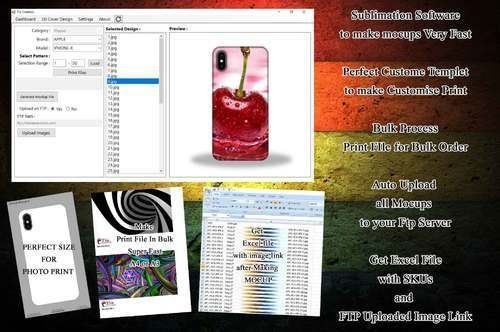
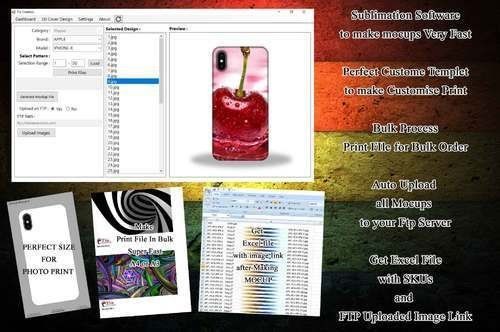
this software will done bulk mocup and bulk print file quick and easy to use you can make 2000 mocups in 20min onlyAdditional Information:
- Production Capacity: 1000
- Delivery Time: 48hours
Comprehensive File Format and Resolution SupportHandle your designs effortlessly with support for PNG, JPG, PSD, SVG, and PDF formats. The software enables high-quality mockup rendering with resolutions up to 4K, ensuring every detail is crisp and print-ready. This makes previewing and preparing your sublimation projects both efficient and professional.
Advanced Customization for Unmatched RealismTake total control of your mockups using intuitive layer management, smart object placement, and dynamic color adjustment tools. These powerful features help you replicate real-world products closely, offering a clear visualization of finished goods before heading to production or client review.
Flexible Output and Seamless IntegrationExport your projects directly as downloadable, print-ready files, or instantly generate shareable links for team or client collaboration. Integrated cloud functionality with Google Drive and Dropbox makes saving and sharing simple and secure, while ongoing software updates guarantee you stay current with new features.
FAQ's of Sublimation Mockup Software:
Q: How can I use the Sublimation Mockup Software to preview my designs before printing?
A: You can upload your designs in supported formats (PNG, JPG, PSD, SVG, PDF) and use the customization tools to place, layer, and adjust your artwork on virtual products. The software renders high-quality, up-to-4K previews that closely simulate the actual final appearance of your sublimation products before you proceed to print.
Q: What systems and hardware are required to run the software smoothly?
A: The software is compatible with Windows 10/11, Mac OS X, and online browsers. For optimal performance, a minimum of 4GB RAM and an Intel i3 processor or higher are recommended. Both single and multi-user licenses are available to suit various team setups.
Q: When are software updates provided, and how do they work?
A: All users receive automatic software updates as part of their license. Updates are delivered seamlessly via the auto-update feature, ensuring access to the latest improvements and security enhancements without manual intervention.
Q: Where are my designs stored, and is there any cloud integration available?
A: You have the option to save your designs locally or integrate with Google Drive and Dropbox for secure cloud storage. This allows easy sharing, remote access, and enhanced collaboration regardless of your location.
Q: What are the benefits of using built-in layer management and smart object placement tools?
A: These tools enable detailed customization and efficient organization of design elements, giving you precise control over positioning and composition. As a result, your mockups are more accurate, visually appealing, and tailored to client or production needs.
Q: How does the software ensure security for my projects?
A: Our solution offers user authentication and file encryption measures to safeguard your designs and account. This ensures that only authorized users have access to your projects and sensitive information remains protected.
Q: What type of support and learning resources are available for new users?
A: We provide 24/7 technical customer support alongside in-app tutorials. Whether you need troubleshooting help or want to learn how to maximize the software's functionality, timely assistance and step-by-step guides are always accessible.





 Send Inquiry



 Send Inquiry
 Send Inquiry
 Send SMS
 Call Me Free